
Who ever heard of carpenters getting together to compare notes on a new hammer--discussing its handle and grip, the balance, or claw? On the other side of town, might some plumbers be having their own talk about the same common tool?
This is ridiculous, of course. People find the tools they need and learn how to use them properly, for one reason only: to solve a problem or complete a project as efficiently as possible. Nobody designs a project around what's in their toolbox. That would be the wrong way to solve a problem.
Fact is, here at ConferenceCalls.com we're in the solutions business. Our great web site offers plenty of great communication solutions, services and innovative technologies.It's where you can get a free conference call, set up a business or audio conference call, or maybe buy a calling card. But even while you're thinking about our conference call services, you're probably also thinking about just how the right internet or phone conference call can make you and your team members more productive.
We all know that the best tools make us more productive in more than one situation. A carpenter might grab his hammer to replace a loose brick in his garden path. A housewife will learn to appreciate the hammer her husband just bought, the next time she has to hang a picture.
There are also many ways to use ConferenceCalls.com services. The far-flung relatives of a hospitalized family member might set up a call to coordinate their care-giving efforts. A principal could call hundreds of alumni to raise funds quickly so she can repair a damaged school roof. Community members might share skills with each other for their new service exchange program on a conference call--reducing inconvenience to older residents or families with small children, and record the call to make meeting minutes unnecessary.
Of course, most of us are in the habit of using conference call services for business meetings. And with all the great new features that our parent company Universal Calling is always adding, businesses will appreciate their convenience and added productivity like never before. But it's not just about business any more. With the explosive growth of social media and long-distance community building, making full use of conference call services is a habit that everyone should consider hammering home.
Tuesday, March 11, 2008


Monday, November 5, 2007
Most Important Conference Call Features
We will be adding many exciting new features and services to our conferencing solutions in the coming weeks, and reviewing all of the new material has got me wondering...what is the most important conferencing feature? Is it the ability to record your call? To lock your conference (to prevent unauthorized participants)? Or is it just a clear connection and a good call host?
We already offer two of those, and we'll be adding the third very soon, along with expanded call capacity and much, much more. I'll make a launch announcement as soon as I can, so stay tuned!
Also, the blog carnival is still alive, and submissions are slowly trickling in. I was expecting many more presentation horror stories and lots of advice and opinions, so feel free to submit if you've got any PowerPoint tales to share....
We already offer two of those, and we'll be adding the third very soon, along with expanded call capacity and much, much more. I'll make a launch announcement as soon as I can, so stay tuned!
Also, the blog carnival is still alive, and submissions are slowly trickling in. I was expecting many more presentation horror stories and lots of advice and opinions, so feel free to submit if you've got any PowerPoint tales to share....
Thursday, October 18, 2007
5 Reasons To Love Conference Calls
I read a lot of negative reactions to conference calls each week, usually because the call rambles on or the topic is boring or participants' dogs/children/co-workers are yapping in the background. I think this communication tool deserves a lot more credit, and here are a few reasons why:
1. They're shorter than "real" meetings.
There's only so long a conference call can go on. Even at low rates, the host is usually aware of how much money is ticking away every minute. Even with compelling topics, there's only so much information that one speaker can recite at one time. And even with a lot of people participating, the "Hey, how's it going?" part of the call doesn't include catered luncheons, coffee breaks, fighting for parking, and all the other things that add time to in-person meetings.
2. They're much easier to "read" than email.
All the emoticons in the world can't populate the emotionally blank world of email. It's certainly possible to convey emotions and undertones in writing, but who has time to do that for every email? Phone time is a great way to figure out if that brief email from your remote team lead was because he's miffed at you or because he was rushed.
3. They're much cheaper than "real" meetings.
Cost savings aren't always a reason to go virtual, but conference calls save everyone involved some significant cash. No airfare, no hotels, no happy hours, no weird group tours.... I don't recommend replacing all of your meetings with conference calls, of course, since social experiences are just as important to business as number crunching, but for really big groups (shareholder calls) and repetitive meetings, conference calls are a great option.
4. They're easy to schedule.
Because your participants don't even need to be in the office to participate, conference calls are much easier to schedule than in-person meetings. This can shorten your sales cycle and boost productivity by reducing time bloat. Why wait three weeks to meet when you can set up a conference call on the fly?
5. They work well with "real" meetings.
So your team is split between Los Angeles, London, and New York? No problem - hold the meeting in one location and connect to the other teams with a speakerphone conference call. You'll have to make sure that your off-site groups are included and that you've distributed any necessary visuals beforehand so that everyone can follow along. Everyone can hear and be heard simultaneously - just make sure your speakerphones are up to the task and you've eliminated as much background noise as possible.
Have I won you over yet? I love big get-togethers, but conference calls offer a lot of benefits that are too good to be ignored. Why do you love conference calls? Leave a comment and let me know.
1. They're shorter than "real" meetings.
There's only so long a conference call can go on. Even at low rates, the host is usually aware of how much money is ticking away every minute. Even with compelling topics, there's only so much information that one speaker can recite at one time. And even with a lot of people participating, the "Hey, how's it going?" part of the call doesn't include catered luncheons, coffee breaks, fighting for parking, and all the other things that add time to in-person meetings.
2. They're much easier to "read" than email.
All the emoticons in the world can't populate the emotionally blank world of email. It's certainly possible to convey emotions and undertones in writing, but who has time to do that for every email? Phone time is a great way to figure out if that brief email from your remote team lead was because he's miffed at you or because he was rushed.
3. They're much cheaper than "real" meetings.
Cost savings aren't always a reason to go virtual, but conference calls save everyone involved some significant cash. No airfare, no hotels, no happy hours, no weird group tours.... I don't recommend replacing all of your meetings with conference calls, of course, since social experiences are just as important to business as number crunching, but for really big groups (shareholder calls) and repetitive meetings, conference calls are a great option.
4. They're easy to schedule.
Because your participants don't even need to be in the office to participate, conference calls are much easier to schedule than in-person meetings. This can shorten your sales cycle and boost productivity by reducing time bloat. Why wait three weeks to meet when you can set up a conference call on the fly?
5. They work well with "real" meetings.
So your team is split between Los Angeles, London, and New York? No problem - hold the meeting in one location and connect to the other teams with a speakerphone conference call. You'll have to make sure that your off-site groups are included and that you've distributed any necessary visuals beforehand so that everyone can follow along. Everyone can hear and be heard simultaneously - just make sure your speakerphones are up to the task and you've eliminated as much background noise as possible.
Have I won you over yet? I love big get-togethers, but conference calls offer a lot of benefits that are too good to be ignored. Why do you love conference calls? Leave a comment and let me know.
Monday, October 15, 2007
Blog Action Day: Save Energy with Conferencing (And Other Tactics)

I'm not going to join in the recent chorus of articles that praise the way conferencing reduces travel (and thus reduces the environmental impact of meetings). I hope you understand that by now. Instead, here is a list of other ways that you can use conferencing (among other practices) to reduce the environmental impact of your job. I've personally done everything on this list over the years, so feel free to ask me questions in the comments section.
1. Take public transportation. Or buy a bike. Or, at least, carpool. Or telecommute?
If we want to use less fuel and control our carbon emissions, we have to...use less fuel. Even if you only practice this one or two days a week, the impact is worth it. Better yet, make it a competition at the office to see how often everyone can get to work without driving alone.
If you can swing it, try working from home one or two days per week. What better way to reduce the environmental impact of your commute than not to commute at all?
2. Recycle.
If it's plastic, paper, or aluminum, you can recycle it. If your office won't pay for pickup (and it's not included with your building/lease), take turns dropping the recycling off at a local center each week. It's not that much work - your turn will probably only come up once every quarter.
Check local government websites for organizations in your area that accept used cell phones and old computer equipment for recycling and repurposing - often these groups will even pick up directly from your office.
3. Make less trash
Go out for lunch rather than ordering take-out if you can, and bring any leftovers home in your own (reusable) plastic container. (Personally, I keep a few in my desk just in case.)
If you do order take-out, use your own silverware (again, keep a stash in your desk) and refuse the plastic packets. (They never work that well anyhow.) Individually wrapped things really make a lot of trash.
If you bring your lunch, follow the same reusable packaging rules. It's cheaper to buy a full-size box and portion it yourself than to buy prepackaged units, and you won't be making all of the extra trash.
As a little bonus, I'd like to say that I know tradeshows and conferences are fun, but...really, where do you think your frisbees and footballs and lanyards and spinning giveaway gizmos end up?
4. Go (and stay) Digital
Making a document on a computer uses energy, sure, but not as much as when you add on printing, copying, and mailing. (I recognize that many things still need real signatures so, obviously, use judgment here.)
Presentations really can work well in the digital realm, and everyone is starting to enjoy the convenience of meeting right from the office. Job interviews, too, at least for the first round - most everyone has access to a webcam, so consider saving money on plane fares and hotels in the early stages of your hiring process by interviewing online.
5. Look for the Oddities
At one of my previous jobs, the custodians were trained to empty every trash can, every night, no matter what. My empty trash bag was swapped for a new trash bag every night until I finally worked late enough to notice. There were about 1200 people in that building, so 1200 empty and nearly-empty bags went into the trash every night. 312,000 bags per year. Needless to say, I spoke to my supervisor and pointed out the cost savings.
Could your company order unbleached paper products for the bathroom? Provide recycled office supplies? Supply refillable pens rather than cheap ballpoints? Put a water filter on the sink rather than ordering bottled water service? Buy coffee for the break room that was made without destroying or polluting the land on which it was grown?
There are many small ways to lessen the environmental impact of your job. There are many more than I've listed, and most likely some of what I've recommended won't work at your current position. The most important things to remember: you don't have to be a perfect environmentalist, it doesn't have to be a political issue, and every little bit helps.
Friday, October 12, 2007
Web Conference Review
I had the pleasure of attending two more riveting web meetings this week. There were a lot more pluses than minuses, but I have several of each to share with you.
The good:
The bad:
If you have questions about your individual contract, role, tasks, performance, hairstyle, etc., do everyone a favor and save them for a private call. I didn't enjoy being late for my next task because a remote co-worker didn't know when her contract expired.
The good:
- Both used live polls to tailor their content to the audience, which made parts of the presentation much more relevant. (For the conference that actually seemed to be changing things during the conference, it looked like the presenter chose which graphs/slides to show while the poll results were up. To copy him, just make alternate versions of audience-dependent slides and show/hide them in your presentation while the audience is looking at something else, like poll results. Don't try to paste in new images - you run too many technical risks.)
- Both started at 5 after the hour, but scheduled the presentation to start right on the hour. The time change was announced on the welcome screen, so it was only visible after login. The upside of this? Everything got off to a smooth start, and most of the attendants were there for the first slide.
- Vibrant, energetic, captivating speakers. Speakers who weren't reading off of scripts, speakers who actually cared about their topics and were well-prepared.
- I learned that Wainhouse Research has proclaimed ease of use the most important factor in choosing new collaborative technology, by an overwhelming margin.
The bad:
- Made-up words like "rearchitecting"...please, there are so many real words in English that never get used. Try them first.
- One presenter wasn't familiar with his slides, which led lot of flipping around. This was good in that it kept the presentation informal and friendly, but kind of annoying on my screen. The speaker's talent made up for lots of these gaffes.
- One presentation was full of what I will affectionately call "Digg content" - a lot of unsupported generalizations and statistics without sources (and sometimes even without labels...one graph just compared 75% to 26%). Your audience is already online, and verification is just a few clicks away.
- Speak well and plan well
- Accommodate your audience in content and timing
- Know your presentation
- Check your facts and give your sources
- Make it easy for your participants to attend - send reminders, overstate the login information, overstate your goals
If you have questions about your individual contract, role, tasks, performance, hairstyle, etc., do everyone a favor and save them for a private call. I didn't enjoy being late for my next task because a remote co-worker didn't know when her contract expired.
Wednesday, October 10, 2007
Carnival #5: Collaboration
Luke Houghton presents The wiki way of thinking posted at Luke Houghton, saying, "Workplace collaboration is one of the most important things there is in business today. A wiki is a software tool for collaborating. In this post I discuss some things I have learned from implementing a wiki."
Warren Wong presents Why You Should Show Appreciation posted at Personal Development for INTJs, saying, "Why you should show appreciation for the little things people do and how to go about doing it."
This was a requirement at one of my previous jobs; no one could be considered for a supervisor position unless he or she had demonstrated a consistent level of positive peer feedback. Who likes feeling underappreciated?
GreatManagement presents Tom Peters Recommends The Dream Manager posted at The GreatManagement Blog.
Even if you don't buy the book, the takeaway from this summary is clear: your organization, big though it may seem, is just the product of...people.
Karel Vandenberghe presents Web 2.0 vs Web 3.0: multi-platform mass collaboration and mashups posted at Open Innovators - Open innovation and crowdsourcing, saying, "Multi-platform Mass Collaboration and Mashups will be key elements in the future evolution of the internet."
Don't worry, there's no Web 3.0 yet. Check out the great advice on how to futureproof your projects, which applies even if you're not a developer.
The Career Counselor presents Etiquette for the Office Cube Culture posted at ask the CareerCounselor.
My favorite tip: be quiet. My edit: no one thinks your ringtone is as cool as you do. Working together includes the social aspects of work, too, not just the typing and number-crunching parts.
David B. Bohl presents Luck: Helping Each Other and Paying it Forward posted at Slow Down Fast Today!, saying, "An ancient Greek named Menander said, “If we always helped each other, no one would need luck.”"
Why wait for luck to come your way when you can make your own...or your team's?
Jay Gordon Cone presents The "must-have" skill for every leader posted at Interaction Associates - Thought leadership and practical tools for collaboration.
Is it the ability to prove ROI? PowerPoint skills? You'll have to click through and find out (but it's worth it!)
FitBuff presents Negativity is Contagious, Are You Immune? posted at FitBuff.com's Total Mind and Body Fitness Blog.
I'm not sure about the "science" behind this, but it's true even without that - if you bring negativity into your team, guess what you're going to receive? I've been on several teams in which the motto was "Give what you need, get what you give." It works startlingly well.
That concludes this workplace collaboration edition. The theme of our next edition will be Presentations!
I was so inspired by those presentation blunders that I'm dying to hear more. So, tell me, what are your presentation nightmares? What's the worst - or best - presentation you've ever attended, and what made it so terrible (or great)? What can we do to stop the spread of the 300 slide presentation? Please remember: posts that do not address the designated topic will not be included in the carnival.Submit your blog article to the next edition of the business communications carnival by using our carnival submission form. Past posts and future hosts can be found on our blog carnival index page.
Monday, October 8, 2007
Improve your Email (Bonus: Presentation Disasters)
In keeping with the upcoming workplace collaboration carnival, here are my three favorite ways to improve your office email skills right now [more reference/inspiration at Web Worker Daily and elsewhere online].
1. Wait at least 15 minutes before you hit "send" (5 minutes if it's truly an urgent reply).
During that time, work on another task and then reread the sender's original message. (Be sure to save a draft before you change tasks.) Make sure you have correctly understood what the email's author was saying and that you've answered his/her questions. Exchanging information is, I assume, the purpose of all email, but you might be surprised how often the wrong information gets sent in the race to hit the "send" button.
2. Use paragraphs and bullet points liberally.
It sounds crass, but a dense block of text can be intimidating to your reader (even for interoffice communication - admit it, how many times have you skimmed "for the main point" of an important but long email?). If your action items are buried 20 lines deep, you are less likely to get the information that you need. I'm a fan of the lyrical and winding missive when I'm on my own time, but I've long since learned to keep my work emails quick and direct.
A related recommendation is to use bold, italics, and even colors to clue team members into the structure of your email, especially if it's on the long side. If you can anticipate that your reader is just going to scan, you might as well set your writing up to get a semblance of your point across.
3. Rethink the need to send the email altogether.
Could (or should) you just research this information yourself? If it's really urgent, would a phone call make more sense? The time to complain about inbox bloat is over; do your part to fight it by reducing the amount of email that you send to the bare minimum.
Everyone's time is limited at the office, so make the most of the chunk of your day that is spent sending, reading, and replying to email. I'd like to recommend that you organize and archive your email for easy reference, but those tips could easily fill a series of posts, so look for that information in the future. A parting tip: turn on automatic spell check (your future will thank you).
Here's the bonus: Presentation Disasters (I challenge you not to laugh at - or relate to - these terrifying presentation moments. These stories make reading directly from PowerPoint slides slightly less offensive.)
1. Wait at least 15 minutes before you hit "send" (5 minutes if it's truly an urgent reply).
During that time, work on another task and then reread the sender's original message. (Be sure to save a draft before you change tasks.) Make sure you have correctly understood what the email's author was saying and that you've answered his/her questions. Exchanging information is, I assume, the purpose of all email, but you might be surprised how often the wrong information gets sent in the race to hit the "send" button.
2. Use paragraphs and bullet points liberally.
It sounds crass, but a dense block of text can be intimidating to your reader (even for interoffice communication - admit it, how many times have you skimmed "for the main point" of an important but long email?). If your action items are buried 20 lines deep, you are less likely to get the information that you need. I'm a fan of the lyrical and winding missive when I'm on my own time, but I've long since learned to keep my work emails quick and direct.
A related recommendation is to use bold, italics, and even colors to clue team members into the structure of your email, especially if it's on the long side. If you can anticipate that your reader is just going to scan, you might as well set your writing up to get a semblance of your point across.
3. Rethink the need to send the email altogether.
Could (or should) you just research this information yourself? If it's really urgent, would a phone call make more sense? The time to complain about inbox bloat is over; do your part to fight it by reducing the amount of email that you send to the bare minimum.
Everyone's time is limited at the office, so make the most of the chunk of your day that is spent sending, reading, and replying to email. I'd like to recommend that you organize and archive your email for easy reference, but those tips could easily fill a series of posts, so look for that information in the future. A parting tip: turn on automatic spell check (your future will thank you).
Here's the bonus: Presentation Disasters (I challenge you not to laugh at - or relate to - these terrifying presentation moments. These stories make reading directly from PowerPoint slides slightly less offensive.)
Wednesday, October 3, 2007
Collaborative Meetings?
Zane Safrit's recent post on collaborative meetings fits in perfectly with the upcoming blog carnival theme of workplace collaboration - be sure to check it out! We've never had any pastry presentations here, but maybe it's time to start!
There are a lot of definitions for collaboration out there, including "[the] act of cooperating traitorously with an enemy that is occupying your country " (not such a good one for the office) and the more apt: "a structured, recursive process where two or more people work together toward a common goal—typically an intellectual endeavor that is creative in nature—by sharing knowledge, learning and building consensus."
So, basically, working together - effectively. Group projects in the office bring up many of the misgivings and questions that they did even in elementary school. Will one person end up doing all the work? How will credit be shared? What will we do with the slackers? How do we ensure that everyone's voice is heard, especially when offsite workers are involved? How (and when) do we set goals and determine success?
How do we collaborate effectively?
The right tools can make the job easier, like web conferencing, instant messaging, conference calls, and even plain old meetings, but a web conference session does not guarantee effective collaboration! Here are some things to think about when beginning a collaborative project:
There are a lot of definitions for collaboration out there, including "[the] act of cooperating traitorously with an enemy that is occupying your country " (not such a good one for the office) and the more apt: "a structured, recursive process where two or more people work together toward a common goal—typically an intellectual endeavor that is creative in nature—by sharing knowledge, learning and building consensus."
So, basically, working together - effectively. Group projects in the office bring up many of the misgivings and questions that they did even in elementary school. Will one person end up doing all the work? How will credit be shared? What will we do with the slackers? How do we ensure that everyone's voice is heard, especially when offsite workers are involved? How (and when) do we set goals and determine success?
How do we collaborate effectively?
The right tools can make the job easier, like web conferencing, instant messaging, conference calls, and even plain old meetings, but a web conference session does not guarantee effective collaboration! Here are some things to think about when beginning a collaborative project:
- Why is this collaborative? Would it make more sense to work with a different structure?
- What will we gain from collaboration? Different viewpoints? A stronger team?
- Who will be included? Can we benefit from utilizing employees from different departments?
- Can we use an open, collaborative dialogue to improve our overall practices? Are we doing things redundantly? Wasting time or resources some other way?
- What happens if something goes wrong? To whom are concerns addressed?
- Is this a flat team (no leader), or is there a management structure?
- How much consensus is enough consensus? Do we need 100% agreement?
- How will knowledge be shared? Do team members already know and/or work well with each other?
Friday, September 28, 2007
Plan Your Best Web Conference
Web conferencing is all over the news this week - it looks like it's really taking hold across the business landscape! I attended a few myself recently, and learned many new things about how to hold a good web conference (and how to hold one that's memorable for all the wrong reasons). Here's what I learned this week:
1. Use the Power of PowerPoint
There are so many resources online to help you improve your slides. Take advantage of them! This week I was subjected to 10 point font, slides with 12+ lines of text, unlabeled graphs, and the 2 slides/minute pace, none of which helped the presenter make his point. Overall, remember: less is more, graphics are great, and your words had better work for you.
2. Speak Up
Bad headsets and muffled microphones were in style this week. I should be so engaged by your presentation that I shouldn't notice your lousy audio quality, but just in case, test your audio beforehand to see what it sounds like. If every third word is just a burst of static, adjust or replace your microphone. Consider having separate audio and web rather than streaming it all over the internet - all-in-one seems more convenient, but it can be tricky for novices to get online audio to sound good, and those with slow connections could miss important words.
3. Plan...and be Polite
It was obvious that there hadn't been any effective planning for this week's worst web conference. The moderator kept handing off questions to the wrong host, the hosts weren't listening during the Q&A and didn't have their answers ready, and the session degraded very quickly as the presenters (one a c-level executive) looked more and more foolish.
Talk to your co-host(s) and moderator beforehand about how the event will be structured. Run through your presentation several times. Be prepared for Q&A, which means you have to be knowledgeable about your subject beyond your slide notes. Attendees are more savvy than you think they will be - web conferences have to work now that the novelty has faded. If something goes wrong during the event, be professional and recover quickly. Don't start placing blame during the presentation, especially if you are archiving your webcast for future downloads!
4. Use the Features
Something that all of this week's conferences did well was polling - using quizzes to keep the audience engaged and to tailor the content to the audience's interests. Some things that I could have seen a lot more of were screenshots and hands-on demos (especially in the smaller conferences); this week's presentations were very talk-y and didn't keep my scant attention very well.
5. Use Common Sense
Turn off your cell phone (c-level executive!). Deliver content that has value, rather than a summary of what's already available on your website, especially if that's where your participants registered for your web conference. DO NOT READ OFF OF YOUR SLIDES. Arrive early. Be confident and composed; while web conferencing offers a chance for more "informal" meetings, this is still a business setting. Friendly jokes, customized content, and time with individual participants can be great, but emotional outbursts and inadequate content or preparation are absolutely not!
I'll be attending more web conferences in the future, so I'll let you know how these next meetings go. If you have any web conferencing tips (or anti-tips) to share, feel free to leave them in the comments.
1. Use the Power of PowerPoint
There are so many resources online to help you improve your slides. Take advantage of them! This week I was subjected to 10 point font, slides with 12+ lines of text, unlabeled graphs, and the 2 slides/minute pace, none of which helped the presenter make his point. Overall, remember: less is more, graphics are great, and your words had better work for you.
2. Speak Up
Bad headsets and muffled microphones were in style this week. I should be so engaged by your presentation that I shouldn't notice your lousy audio quality, but just in case, test your audio beforehand to see what it sounds like. If every third word is just a burst of static, adjust or replace your microphone. Consider having separate audio and web rather than streaming it all over the internet - all-in-one seems more convenient, but it can be tricky for novices to get online audio to sound good, and those with slow connections could miss important words.
3. Plan...and be Polite
It was obvious that there hadn't been any effective planning for this week's worst web conference. The moderator kept handing off questions to the wrong host, the hosts weren't listening during the Q&A and didn't have their answers ready, and the session degraded very quickly as the presenters (one a c-level executive) looked more and more foolish.
Talk to your co-host(s) and moderator beforehand about how the event will be structured. Run through your presentation several times. Be prepared for Q&A, which means you have to be knowledgeable about your subject beyond your slide notes. Attendees are more savvy than you think they will be - web conferences have to work now that the novelty has faded. If something goes wrong during the event, be professional and recover quickly. Don't start placing blame during the presentation, especially if you are archiving your webcast for future downloads!
4. Use the Features
Something that all of this week's conferences did well was polling - using quizzes to keep the audience engaged and to tailor the content to the audience's interests. Some things that I could have seen a lot more of were screenshots and hands-on demos (especially in the smaller conferences); this week's presentations were very talk-y and didn't keep my scant attention very well.
5. Use Common Sense
Turn off your cell phone (c-level executive!). Deliver content that has value, rather than a summary of what's already available on your website, especially if that's where your participants registered for your web conference. DO NOT READ OFF OF YOUR SLIDES. Arrive early. Be confident and composed; while web conferencing offers a chance for more "informal" meetings, this is still a business setting. Friendly jokes, customized content, and time with individual participants can be great, but emotional outbursts and inadequate content or preparation are absolutely not!
I'll be attending more web conferences in the future, so I'll let you know how these next meetings go. If you have any web conferencing tips (or anti-tips) to share, feel free to leave them in the comments.
Wednesday, September 26, 2007
Carnival #4: Web Conferencing
Charles H. Green presents When On-message Marketing Makes for Off-trust Sales posted at Trust Matters.
Who knows your customers better - sales or marketing? Or does each department know different faces of the same customer? Mr. Green delivers a reminder to avoid over-branding at the expense of alienating your customers, something especially smart to think about when designing online presentations. You're presenting to people, after all.
Chris Tackett presents 5 Steps To Turn More Leads Into Cash! posted at Direct Marketing News.
Web conferencing can help with at least three of these steps. Key takeaway: prospects are people, and they don't like to be kept waiting.
Chris Russell presents Improve Employee Productivity - Put Your Policy and Procedure Manuals Online posted at Productivity Planner.
Why not record HR presentations and put them online so new hires (and veterans) can view them from their desks? No one likes to hunt for answers to important questions.
edithyeung presents How to Read People and Get Your Point Across? posted at Edith Yeung.Com: Dream. Think. Act..
Design your presentations to work for all learning types - an especially important point when dealing with online audiences who may already be multitasking.
Jay Deragon presents The Reputational Factors posted at A Relationship Economy..... With Whom & What, saying, "How do people establish trust in the virtual world where there is little, if any, physical interaction? The online social networks of human interaction are challenging the accumulated wisdom on how virtual human interactions can occur and subsequently how trust and reputation are established."
Dax Desai presents Google Spreadsheets - Part Deux posted at Dax Desai.
Collaboration isn't just for one-to-many presentations - one-on-one work can benefit, too. Here's an example using the freely available Google Spreadsheet app.
Pete Johnson presents Games remote people can play posted at Nerd Guru, saying, "When you have a team of people who work remotely from one another, conducting traditional teambuilding exercises is next to impossible. This article describes a word game using the Google search engine that can give a group a brief shared experience in 10 minutes and liven up participation in any teleconference by getting people talking.
Pete Johnson
HP.com Chief Architect
http://nerdguru.net"
Madeleine Begun Kane presents Those Unspeakable Meetings posted at Mad Kane's Humor Blog.
Just some meeting humor, but a good point as well: try to communicate during your meetings, online or in person.
That concludes this edition our our business communications carnival. Submit your blog article to the next edition of business communications using our carnival submission form. The theme for the next carnival is: workplace collaboration. What's working, and what isn't? Does instant messenger help or hurt your productivity? What's the best collaboration tool - email, web conferencing, or plain old face-to-face meetings? Let's hear it all.
Past posts can be found on our blog carnival index page.
Thursday, September 20, 2007
International Conferencing for 3.7 cents
We've rolled out 23 new international local access numbers - view the whole list here: http://www.conferencecalls.com/accessnumbers.asp. The international local access rate is just 3.7 cents/minute (USD). Supported countries include Australia, France, Germany, Portugal, Switzerland, and the United Kingdom.
We still have our same global toll-free access numbers as well, with rates starting at 3.7 cents/minute (USD) as well.
What's the difference between local (toll) access and toll-free?
Local access (toll) calls are free to the caller, as long as the number is within the caller's local calling area. For example, if you live in London and call a London number, you are not assessed additional charges as long as the phone carrier considers the number to be within your local calling area. Local access calls are nearly always cheaper to the host than toll-free calls.
Toll-free calls are generally free to the caller (except for any caller-incurred fees stemming from use of a cell phone, payphone, etc.), but the host pays a higher per-minute rate for this convenience. International toll-free access is complex; in brief, a toll-free number from another country will likely not be a free call (for example, someone calling a French toll-free number from Norway will likely incur fees).
I am happy to try to answer any specific local or toll-free access questions you might have (just leave them in the comments). Enjoy the new access numbers - and the savings! If you're not yet a ConferenceCalls.com customer, you can receive a a free 100 minute trial or open an account instantly and get 100 bonus minutes for each account and sub-account.
We still have our same global toll-free access numbers as well, with rates starting at 3.7 cents/minute (USD) as well.
What's the difference between local (toll) access and toll-free?
Local access (toll) calls are free to the caller, as long as the number is within the caller's local calling area. For example, if you live in London and call a London number, you are not assessed additional charges as long as the phone carrier considers the number to be within your local calling area. Local access calls are nearly always cheaper to the host than toll-free calls.
Toll-free calls are generally free to the caller (except for any caller-incurred fees stemming from use of a cell phone, payphone, etc.), but the host pays a higher per-minute rate for this convenience. International toll-free access is complex; in brief, a toll-free number from another country will likely not be a free call (for example, someone calling a French toll-free number from Norway will likely incur fees).
I am happy to try to answer any specific local or toll-free access questions you might have (just leave them in the comments). Enjoy the new access numbers - and the savings! If you're not yet a ConferenceCalls.com customer, you can receive a a free 100 minute trial or open an account instantly and get 100 bonus minutes for each account and sub-account.
Tuesday, September 18, 2007
Presently (Google's Presentation Tool)
I spent a little under 5 minutes throwing together a demo presentation of Presently, the just-publicly-launched presentation tool from Google. Give it a try here: http://docs.google.com/Present?docid=dhtt7t75_60hdjpch and let me know how it works as an audience member.
What Presently includes:
Pre-designed themes
Flexible, click-and-drag editing options in your web browser
Font and formatting controls, including highlighting
What it does not include:
The ability to export to .ppt (key for many web conferencing services)
Live collaboration - I don't think. I don't believe that anyone can highlight or annotate during the presentation, but I will have more time to test later on.
Presenter controls - all you can do is view your roster, and audience members can scroll through slides at their own pace.
A screenshot:
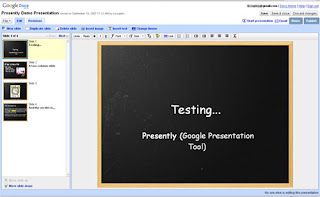
It was fun to work with, but I can't call it 100% useful for my presentation needs until it has greater compatibility and more live controls. Overall, a strong B-. Definitely worth a few minutes of playtime, and definitely something to keep your collaborative eye(s) on.
What Presently includes:
Pre-designed themes
Flexible, click-and-drag editing options in your web browser
Font and formatting controls, including highlighting
What it does not include:
The ability to export to .ppt (key for many web conferencing services)
Live collaboration - I don't think. I don't believe that anyone can highlight or annotate during the presentation, but I will have more time to test later on.
Presenter controls - all you can do is view your roster, and audience members can scroll through slides at their own pace.
A screenshot:

It was fun to work with, but I can't call it 100% useful for my presentation needs until it has greater compatibility and more live controls. Overall, a strong B-. Definitely worth a few minutes of playtime, and definitely something to keep your collaborative eye(s) on.
Friday, September 14, 2007
Web Conferencing in Your Industry
I've been seeing a lot recently about telemedicine, web conferencing in senior living facilities, and other unconventional applications of conferencing technology. How is your industry using audio, web, or video conferencing - or how could you benefit from using it?
Today, The Common Scold published a brief piece about Law Firm Inc.'s recent findings on web conferencing use in American law firms. Two exciting highlights :
• 77% of firms are using web conferencing software
So, tell me: how has your business benefited from web or other conferencing?
Today, The Common Scold published a brief piece about Law Firm Inc.'s recent findings on web conferencing use in American law firms. Two exciting highlights :
• 77% of firms are using web conferencing software
• 77% of those using web conferencing cited increased productivity, while 75% cited better client service and 44% saw improved processes.
To me, web conferencing is all about better communication than ever before. Why wait to fax or email a document and discuss changes over the phone when you can chat or talk about a document with the whole team all at once? Asynchronous collaboration can be a real pain, and it takes a lot longer for each person to review changes and information individually than for a team to do it all at once.So, tell me: how has your business benefited from web or other conferencing?
Wednesday, September 12, 2007
Carnival: Audio Conferencing?
It is my personal goal to keep the information which I present here as streamlined and useful as possible to my readers. I am quite interested in receiving future submissions about business communication, especially conferencing tips, reviews, and techniques, but there are many other venues available (even through blogcarnival.com) for other topics.
Without any further business on my end, here are the selected submissions for this (theoretically) audio-conferencing themed carnival:
Jay Gordon Cone presents Interaction Associates - Thought leadership and practical tools for collaboration. posted at Interaction Associates - Thought leadership and practical tools for collaboration.
How do you practice thought leadership, especially with a distributed team? This post features some useful tips on moving toward "collective intelligence", the optimal synergy that comes from successful teams.
Jason Rakowski presents Building Relationships In Business - Why It's So Important posted at Learn Good Customer Service
As you read this, consider too how web conferencing may be an important part of your customer service package - could your customers benefit from guided product demonstrations? How could other collaboration services make it easier for you to maintain these important relationships?
Luke Houghton presents 5 golden rules of making a presentation posted at Luke Houghton.
5 rules, up to and including: be prepared!
Phil B. presents The Right and Wrong Ways to Boost Morale « Phil for Humanity posted at Phil for Humanity.
Phil's recommendations include improving communication and allowing telecommuting to boost morale in his workplace, both of which can be accomplished through web and video conferencing, as well as other online collaboration services. Might the same be true for yours?
Christine Scivicque presents 10 Ways to Build a Better Team and How to be a Good Listener , both posted at The Executive Assistant's Tool Box.
Strong teams are critical to collaboration, while listening skills are indispensable for all types of conferencing (and meetings in general, of course). These articles are both very informative.
Raj Dash presents Bootstrapper » 11 Web-based Project Management, Collaboration and Communication Tools posted at Bootstrapper, saying, "Businesses that have a need to communicate online with clients or remote employees have a number of choices. Here are a selection of 11 online tools for project management, communication and collaboration."
Warren Wong presents Be A Good Manager By Letting People Learn And Grow posted at Personal Development for INTJs, saying, "Information on the common mistakes an new manager makes and tips on how to be a good manager."
Sidhusaaheb presents Google's Gaffe posted at I, Me, Myself.
How do you handle a distributed, international team? Cultural sensitivity evidently counts for a lot; here's one story, but I'm sure there are many worldwide.
Leon Gettler presents Top 5 email compliance mistakes posted at Sox First, saying, "Here are the top five email compliance mistakes: mistakenly assuming you can destroy the documents after the retention period ends, not including all email as a compliance asset, assuming it will be expensive, over-categorizing and making compliance a business goal."
Email compliance information for those of you who have to deal with Sarbanes-Oxley regulations.
Charles H. Green presents The Cold War, the Hot Line and Twitter posted at Trust Matters, saying, "Are you an effective communicator? (Or do you come across as a twit?) Twitter provides a striking example of why veto power, permission and relevance are critical keys to effective communication."
edithyeung presents Disempowering Phrases Successful People Never Say posted at Edith Yeung.Com: Dream. Think. Act..
Some things never to say during your conference calls or other meetings.
wilson ng presents MultiTasking for Productivity posted at Reflections of a BizDrivenLife.
Does multitasking make you more productive? Maybe you really should close Outlook and your web browser during that next web conference.
Steven Silvers presents PowerPoint presentation on news story about business school requiring PowerPoint presentation from applicants. posted at Scatterbox at stevensilvers.com.
Caution: satire. PowerPoint seems to lend itself to satire quite well.
That concludes this edition. Thanks to all who participated, even if I was unable to accept your submission. Submit your (relevant) blog article to the next edition of business communications using our carnival submission form. Only articles that are directly related to web conferencing or online presentations will be accepted for this upcoming edition.
Thursday, September 6, 2007
Promote your Webinar with Eventspan, Slideshare, and Insight24
Note: I am in no way affiliated with Eventspan; I just think it's a good idea.
Have you been to Eventspan.com? The site is still in alpha, but it looks to be fully up and running. Eventspan is (or will eventually be) a database of upcoming webinars. It provides "social media tools and tracking services to optimize the promotion of webcasts and webinars," primarily in the form of web event syndication and slick ad widgets. I'm hoping it will soon blossom into a great networking channel for webcasters, as well as a central clearinghouse for upcoming web presentations.
If your web event has already passed, consider uploading your slide deck to Slideshare so others can view it. If you've got a recording of the entire presentation, you can add it to the growing selection at Insight24. Both of those sites have been described as YouTube for presentations, so you get the idea...they're also great places to find inspiration for your next presentation (or marvel at text-heavy, busy slides).
There are, of course, many ways to promote your web presentations, but these sites seem to have a pretty far reach.
Have you been to Eventspan.com? The site is still in alpha, but it looks to be fully up and running. Eventspan is (or will eventually be) a database of upcoming webinars. It provides "social media tools and tracking services to optimize the promotion of webcasts and webinars," primarily in the form of web event syndication and slick ad widgets. I'm hoping it will soon blossom into a great networking channel for webcasters, as well as a central clearinghouse for upcoming web presentations.
If your web event has already passed, consider uploading your slide deck to Slideshare so others can view it. If you've got a recording of the entire presentation, you can add it to the growing selection at Insight24. Both of those sites have been described as YouTube for presentations, so you get the idea...they're also great places to find inspiration for your next presentation (or marvel at text-heavy, busy slides).
There are, of course, many ways to promote your web presentations, but these sites seem to have a pretty far reach.
Wednesday, September 5, 2007
42+ More Audio Conferencing Tips!
In preparation for next week's audio conferencing carnival, I've rounded up some more useful information on improving conference call productivity and quality.
Conference Call Etiquette (14+1 Tips) from Lyndsay Swinton
Ms. Swinton offers many useful tips here, including "Do start the meeting absolutely on time; don’t reward latecomers’ bad behaviour by waiting for them...." and her final note "Do not sit on a leather chair. Ever." Click over to her article to find out what to do with late arrivals or what conferencing dangers are presented by the leather chair
Anna Zelenka's 27 Tips for Teleconferencing at Web Worker Daily
This is one of my all-time favorite posts on teleconferencing. Although her tips are geared toward people working from home, they're applicable to any conferencing setting. High points: 8. Make it a podcast or just record it for your own use. (within legal boundaries, of course) 20. Have a ready-made excuse in case you do get distracted. (her info here is priceless!) 26. Follow up by email. A recommendation that I made as well, but she gives some other compelling reasons to follow up on a conference call.
Power Conference Calls offers a lot of sage advice, including a great story about why you should keep quiet if something has gone wrong with your conference call, as well as a great way NOT to start your conference call (though I hear it happen all the time).
And don't forget my original post on this topic - Seven Simple Ways to Improve Your Conference Calls. I look forward to seeing more tips and best practices in the upcoming audio conferencing carnival!
Conference Call Etiquette (14+1 Tips) from Lyndsay Swinton
Ms. Swinton offers many useful tips here, including "Do start the meeting absolutely on time; don’t reward latecomers’ bad behaviour by waiting for them...." and her final note "Do not sit on a leather chair. Ever." Click over to her article to find out what to do with late arrivals or what conferencing dangers are presented by the leather chair
Anna Zelenka's 27 Tips for Teleconferencing at Web Worker Daily
This is one of my all-time favorite posts on teleconferencing. Although her tips are geared toward people working from home, they're applicable to any conferencing setting. High points: 8. Make it a podcast or just record it for your own use. (within legal boundaries, of course) 20. Have a ready-made excuse in case you do get distracted. (her info here is priceless!) 26. Follow up by email. A recommendation that I made as well, but she gives some other compelling reasons to follow up on a conference call.
Power Conference Calls offers a lot of sage advice, including a great story about why you should keep quiet if something has gone wrong with your conference call, as well as a great way NOT to start your conference call (though I hear it happen all the time).
And don't forget my original post on this topic - Seven Simple Ways to Improve Your Conference Calls. I look forward to seeing more tips and best practices in the upcoming audio conferencing carnival!
Thursday, August 30, 2007
The Best Time for a Conference Call
How do you schedule your conference calls? Sometimes scheduling is easy, like when everyone is in the same time zone or only an hour apart. But what about bicoastal or international calls?
If your call just needs to link together offices that span North America, consider 10 or 11 AM PST (1 or 2 PM EST). This makes it a lunchtime call for those on Central Standard Time, but at least everyone can be in the office without worrying about arriving early or running late.
The frequently cited best time for an international conference call is 6 a.m. PST. At this time, the times around the world are:
Any other conference scheduling tips and tricks you'd like to share? Feel free to post them in the comments.
If your call just needs to link together offices that span North America, consider 10 or 11 AM PST (1 or 2 PM EST). This makes it a lunchtime call for those on Central Standard Time, but at least everyone can be in the office without worrying about arriving early or running late.
The frequently cited best time for an international conference call is 6 a.m. PST. At this time, the times around the world are:
- Americas - 6 AM Pacific (Seattle, Los Angeles), 8 AM Central (Chicago, Houston) 9 AM Eastern (New York, DC, Miami)
- Europe - 2 PM GMT
- South Africa - 3 PM
- Middle East - 4 PM (Riyadh)
- India - 6:30 PM
- Singapore - 9 PM
- Japan - 10 PM
- Australia - 11 PM (Canberra)
Any other conference scheduling tips and tricks you'd like to share? Feel free to post them in the comments.
Tuesday, August 28, 2007
Enterprise Collaboration
Michael Sampson has just delivered a great roundup in his Enterprise Collaboration and Virtual Teams Report. I was hooked after just the first entry, which is an article examining common workflows and when teams are and are not necessary. The report links to many other articles on the "people" side of collaboration, the technological trends, and other collaboration insights.
Now that enterprise-scale businesses have turned their attention more fully to collaboration, I'm sure that similar articles about the dangers of over-collaboration will surface. Effective collaboration can certainly boost productivity, but collaboration just for the sake of using the new software will probably have the opposite effect.
Enterprise-scale deployment of collaboration tools requires robust conferencing services that can handle the demands of larger, more complex, and more secure meetings. Personally, I've used web conferencing on an enterprise scale for training, sales demonstrations, and inter-office meetings (much better than standalone audio conferencing when software and design questions are being handled). My other enterprise-scale collaboration has been limited to instant messaging, intranet resources, and project management systems, both of which suffered much more from a lack of adoption than a lack of features. (Functionality definitely shared the blame with human issues for the lack of adoption.)
How does your large business use collaboration tools? Are they helping or hurting your productivity? What's your workflow like? If you care to, leave me a comment and let me know. A related survey may be coming soon.
Now that enterprise-scale businesses have turned their attention more fully to collaboration, I'm sure that similar articles about the dangers of over-collaboration will surface. Effective collaboration can certainly boost productivity, but collaboration just for the sake of using the new software will probably have the opposite effect.
Enterprise-scale deployment of collaboration tools requires robust conferencing services that can handle the demands of larger, more complex, and more secure meetings. Personally, I've used web conferencing on an enterprise scale for training, sales demonstrations, and inter-office meetings (much better than standalone audio conferencing when software and design questions are being handled). My other enterprise-scale collaboration has been limited to instant messaging, intranet resources, and project management systems, both of which suffered much more from a lack of adoption than a lack of features. (Functionality definitely shared the blame with human issues for the lack of adoption.)
How does your large business use collaboration tools? Are they helping or hurting your productivity? What's your workflow like? If you care to, leave me a comment and let me know. A related survey may be coming soon.
Friday, August 24, 2007
Presentation Tips (for Web Conferencing and Beyond)
Today's buzz seems to be all about presentation tips, so here are a few sites to help you start improving your PowerPoint presentations. Remember - web conferencing can seem impersonal enough to your participants who aren't accustomed to online communication, so do yourself a favor and make your presentation engaging.
Garr Reynolds (Presentation Zen) on the Takahashi Method
I appreciated the move toward simplicity and away from reading lists of bullet points, but when you get to a slide that's just a number (as with slides that are just images), what is the point of even having the slide? At extremes, I think this method makes the visual part of the presentation irrelevant. Takeaway: Be simple, be innovative, but don't leave your audience with nothing to anchor them.
How I Made My Presentations A Little Bit Better from 43 Folders
This is a great article. The presenter seems to have found an elegant, simple solution to slide content, and he makes a great point - "...consider sometimes showing images and text that make an orthogonal point to what you’re saying aloud to the audience at that moment." People learn and retain more when they discover information for themselves, not when it's told to them, and better still they learn it on their own terms, in their own language. Trust your audience to put two and two together. Lots of other great links and tips in this article.
An older but still relevant list of PowerPoint tips, how-to's, and don'ts from cazh1
Mostly links, but worth a visit...I'd have had to list most of these here separately if this list didn't exist :)
How do you plan for your presentations? Do you use PowerPoint? Keynote? Something else? Have you ever tried these presentation templates? (I've read good things about them but they're not in line with how I currently approach presentation content.) What works to keep your audience interested and get your point across?
Garr Reynolds (Presentation Zen) on the Takahashi Method
I appreciated the move toward simplicity and away from reading lists of bullet points, but when you get to a slide that's just a number (as with slides that are just images), what is the point of even having the slide? At extremes, I think this method makes the visual part of the presentation irrelevant. Takeaway: Be simple, be innovative, but don't leave your audience with nothing to anchor them.
How I Made My Presentations A Little Bit Better from 43 Folders
This is a great article. The presenter seems to have found an elegant, simple solution to slide content, and he makes a great point - "...consider sometimes showing images and text that make an orthogonal point to what you’re saying aloud to the audience at that moment." People learn and retain more when they discover information for themselves, not when it's told to them, and better still they learn it on their own terms, in their own language. Trust your audience to put two and two together. Lots of other great links and tips in this article.
An older but still relevant list of PowerPoint tips, how-to's, and don'ts from cazh1
Mostly links, but worth a visit...I'd have had to list most of these here separately if this list didn't exist :)
How do you plan for your presentations? Do you use PowerPoint? Keynote? Something else? Have you ever tried these presentation templates? (I've read good things about them but they're not in line with how I currently approach presentation content.) What works to keep your audience interested and get your point across?
Tuesday, August 21, 2007
The Cost of Free Conferencing
As a business, especially a small one, there are plenty of reasons to use some of the free tools that are available. If you're in an industry that promotes open source values and practices, you might have a reason to use only free and open access software packages and tools. If you're not, you might want to consider the following questions before you plan your next conference on a "free" platform.
1. Is the free conference call really going to be free?
Free conference calls can be legitimately free. To be free, though, these conference calls require that all participants dial one of a limited number of toll (potentially long-distance) access numbers in order to join a call. If your callers aren't local to the area of the free access number, each caller will pay for every minute of your free conference. Sometimes ok, but sometimes not.
2. What about toll-free access?
The host of a free conference call pays about 10 cents per minute for every participant who calls in using a toll-free access number. This is substantially higher than most standard (non-free) conference call providers' toll-free rates; those at ConferenceCalls.com begin at 3.7 cents per user per minute.
3. Will the free conference call support international users?
Probably, but each international user will have to pay for long-distance access to the call. International long-distance without calling cards or dial-arounds can cost upward of several dollars per minute (an expense that will be billed to each caller individually).
4. Will the free conference call have the features that I need?
Maybe. If you have fewer than 100-150 callers and don't need to do anything other than talk, probably. If you need recording, account records and live conference management, or roll call, entry/exit announcements, conference lock, and other in-call features, then probably not.
5. Will the free conference call service be available when I need it?
Not to scare you, but remember that free conference call providers across the country were recently blocked by several major carriers due to carrier billing conflicts. Is this something that you can risk when scheduling your conference call?
If your business depends on maintaining a seamlessly professional public face, you might want to go ahead and pay for your next conference call to best serve your clients and preserve your company's image. Even if you're just a tiny start-up, a professional conference call isn't beyond your budget (and it could well prove your business knowledge and dedication to your participants). Try our call cost calculator and see how much (or little) it would set you back.
1. Is the free conference call really going to be free?
Free conference calls can be legitimately free. To be free, though, these conference calls require that all participants dial one of a limited number of toll (potentially long-distance) access numbers in order to join a call. If your callers aren't local to the area of the free access number, each caller will pay for every minute of your free conference. Sometimes ok, but sometimes not.
2. What about toll-free access?
The host of a free conference call pays about 10 cents per minute for every participant who calls in using a toll-free access number. This is substantially higher than most standard (non-free) conference call providers' toll-free rates; those at ConferenceCalls.com begin at 3.7 cents per user per minute.
3. Will the free conference call support international users?
Probably, but each international user will have to pay for long-distance access to the call. International long-distance without calling cards or dial-arounds can cost upward of several dollars per minute (an expense that will be billed to each caller individually).
4. Will the free conference call have the features that I need?
Maybe. If you have fewer than 100-150 callers and don't need to do anything other than talk, probably. If you need recording, account records and live conference management, or roll call, entry/exit announcements, conference lock, and other in-call features, then probably not.
5. Will the free conference call service be available when I need it?
Not to scare you, but remember that free conference call providers across the country were recently blocked by several major carriers due to carrier billing conflicts. Is this something that you can risk when scheduling your conference call?
If your business depends on maintaining a seamlessly professional public face, you might want to go ahead and pay for your next conference call to best serve your clients and preserve your company's image. Even if you're just a tiny start-up, a professional conference call isn't beyond your budget (and it could well prove your business knowledge and dedication to your participants). Try our call cost calculator and see how much (or little) it would set you back.
Subscribe to:
Posts (Atom)


